 Meta Tech Provider
An AI agent that sees your customer's screen, and helps them finish.
Inside your website or mobile app, it answers about what is in front of your customer, fills in the form, points at the right button and steps in when they get stuck. By chat or by voice, in their language.
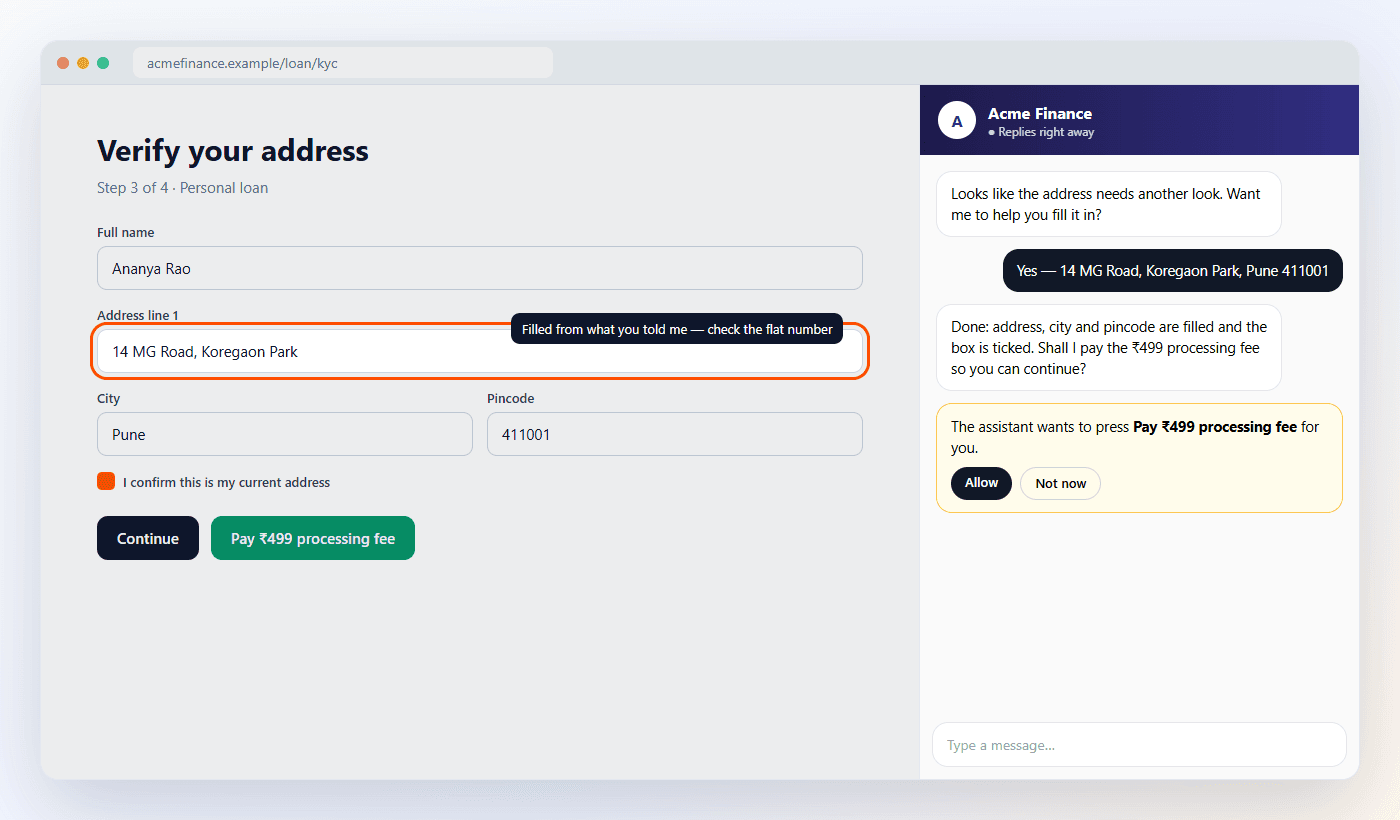
Illustration with an example business.
Not a chatbot in a corner. An agent on the screen.
A chat window answers questions. This agent helps your customer get through the screen they are stuck on.
Sees the screen
The page or app screen your customer is on: the form, which fields are empty, the error under the address, the buttons. So it answers about what is in front of them.
Fills it in
“My address is 14 MG Road, Pune 411001” — and the address, city and pincode are filled, the box ticked. It says what it changed so your customer can check.
Points the way
Highlights the field or button that comes next, with a short note beside it, instead of describing where to look.
Asks before it pays
Anything that pays, submits or confirms waits for your customer to tap Allow. Passwords, card, CVV, OTP, Aadhaar and PAN fields are never read or filled.
Steps in when someone is stuck
An error left unfixed, the same mistake twice, no progress, repeated taps, a move to leave. Your rules decide where it steps in and what it says.
Talk or type
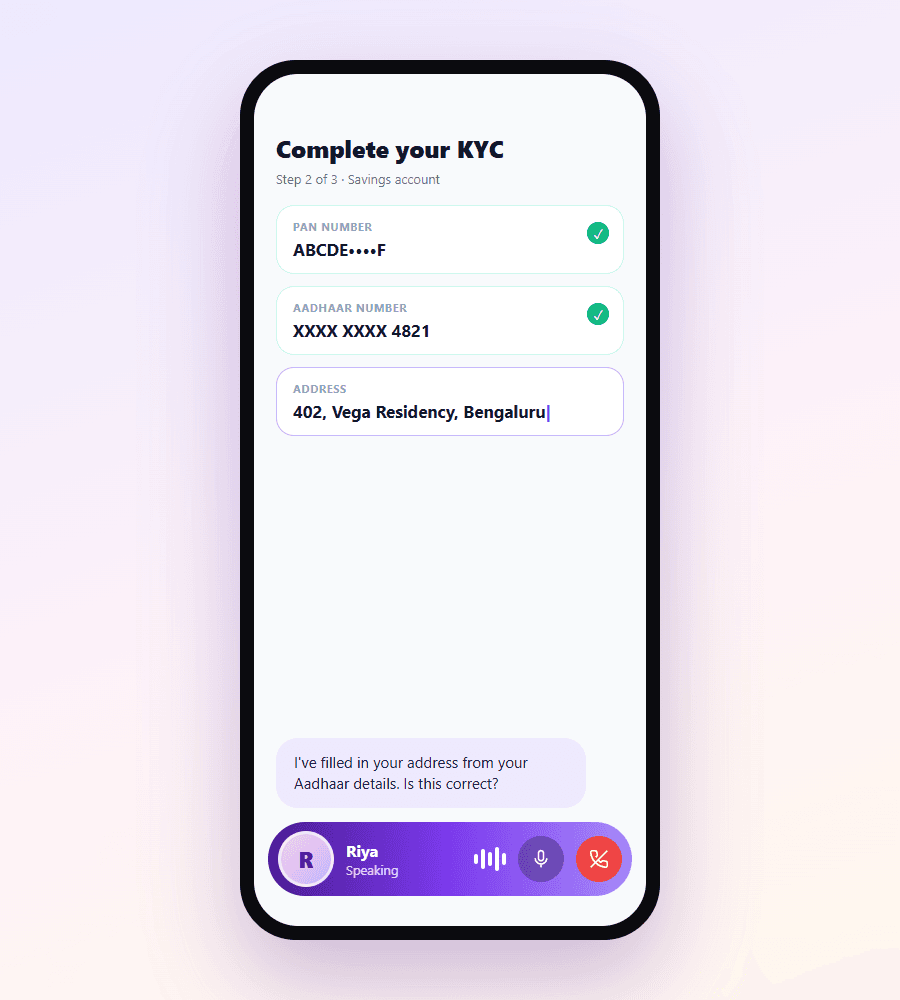
The same agent takes voice calls in the panel. The call shrinks to a small bar with a live caption, so the form stays in view while it fills.
Uses your own actions
Retry an upload, apply a coupon, fetch loan offers: your site or app registers the actions, and the agent runs them in your customer's own session.
One agent, every channel
The same agent and memory as your WhatsApp, voice calls and website chat. A customer who stops in your app and continues on WhatsApp does not start again.
Your customer talks. The screen fills itself in.
One tap starts a voice call with the same agent. Instead of covering your app, the call becomes a small bar with the agent's name, a live caption of what it just said, mute and hang-up — so your customer watches their details go in while they speak, and can correct anything on the spot.
- Indian languages, on the same voice stack as ThinnestAI phone agents
- Live caption of the agent's words above the call bar
- The screen behind stays visible and usable during the call
- Anything that pays or submits still waits for the customer's Allow
Where it earns its place
Wherever customers drop off between starting and finishing.
Onboarding & KYC
Catch customers at the step where they get stuck — the address that will not validate, the document that will not upload — and help them finish on the spot.
In-app sales
When someone lingers on a plan or a loan offer, the agent explains the options in plain words and shows the right product as a card they can tap.
Feature adoption
On the screen where a feature lives, the agent points at it and walks the customer through it once. No tutorial video to make, or for them to watch.
Support
Account questions, disputes and requests answered on the screen they are about, 24/7 — and a person takes over when it needs one.
Built for lending, insurance, banking, wealth and other journeys with long forms — read how an in-app agent helps customers finish KYC.
Three steps to switch it on
Add it to your site or app
On a website, the one-line ThinnestAI widget tag you may already have. In an app, our SDK, which shows the agent in a sheet over your screen.
Choose what it may do
Switch it on for your agent and choose its actions: point, fill, choose, tick, press, open pages, and your own actions. Mark anything off-limits.
Decide when it steps in
Pick the moments — an error on the address step, two minutes idle on checkout — and write what the agent says. Cap how often per visit.
Your customer's data stays theirs
- The agent sees which fields are filled, not what is in them — unless you mark a field as readable.
- Passwords, card numbers, CVV, OTP, Aadhaar and PAN fields are never read or filled. PAN, Aadhaar and card numbers shown on a page are masked before anything leaves it.
- Web addresses leave without their query strings, which often carry tokens or emails.
- Anything that pays, submits or confirms waits for your customer's Allow. Anything you mark off-limits is never touched.
- Your own actions run in your customer's own session. No credentials pass through ThinnestAI.
Show us the step where customers drop off
We will set the agent up on that screen of your website or app, with the moments it steps in and the actions it may take.
In-App AI Agent FAQs
What is an in-app AI agent?
An AI agent that lives inside your website or mobile app and can see the screen your customer is on. It answers questions about what is in front of them, fills in fields, points at the right button, and steps in on its own when someone gets stuck, so more customers finish what they started.
Does the agent see everything my customer types?
No. It sees the structure of the screen: headings, the form, which fields are filled or empty, error messages and buttons. The values your customer types stay on their device unless you mark a field as readable. Passwords, card numbers, CVV, OTP, Aadhaar and PAN fields are never read or filled, and PAN, Aadhaar and card numbers shown on the page are masked before anything leaves it.
Can it press buttons like Pay or Submit?
It can press buttons and links, but anything that pays, submits or confirms waits for your customer to tap Allow in the chat first. You can mark any element as off-limits, and switch off each kind of action — filling, choosing, ticking, clicking, opening pages — for your agent.
Which platforms does it work on?
Websites today, with the same one-line script tag as the ThinnestAI chat widget. SDKs for Android, iOS, React Native and Flutter are in early access: the same agent, chat and voice inside your app, acting on the screens your app describes to it.
How does it know when a customer is stuck?
It watches for friction: a field error left unfixed, the same error twice, no progress for a while, repeated taps on something that does not respond, or a customer about to leave. You decide on which pages it steps in, after how long, what it says, and how many times per visit.
Can the agent use my own systems?
Yes. Your site or app can register its own actions — retry an upload, apply a coupon, fetch loan offers — and the agent runs them in your customer's own session. No credentials pass through ThinnestAI.
Can customers talk instead of typing?
Yes. The same agent takes voice calls in the panel. During a call it shrinks to a small call bar with a live caption, so your customer watches their form being filled while they speak.
Does it remember the customer on WhatsApp or a phone call?
Yes. It is the same ThinnestAI agent you use on WhatsApp, voice calls and website chat, with the same knowledge and the same memory of the customer, so nobody has to start again on another channel.
What does it cost?
The in-app agent is available on request while we roll it out. Book a demo and we will set it up for your website or app.
Read how the in-app agent works, or the friction signals that tell you a customer is stuck.